

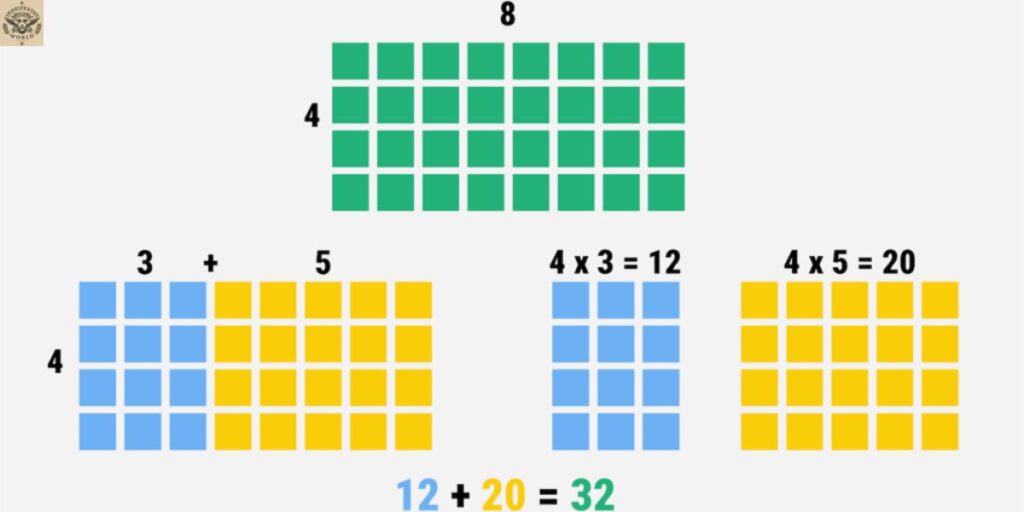
Multiplication and division can feel like two completely different skills, but an area model shows students they actually work the same way, just in reverse. Instead of asking learners to memorize a procedure, an area model gives them a rectangle they can draw, label, and reason through, turning an abstract multiplication equation or division equation into something visual and concrete. This visual math model connects the familiar formula for area, length times width, to the number of work students are already doing with place value and expanded form.
At Meaningful Math, an area model isn’t treated as just another trick to memorize. It’s built around real understanding, using partial products, decomposing numbers, and the distributive property to show students exactly why an answer works, not just how to get one. Whether it’s used for area model multiplication, area model division, or even area model fractions later on, this single rectangular model gives students a math strategy that grows with them, from their first two-digit multiplication problem all the way through more advanced arithmetic.
What Is an Area Model?
If you have ever wondered what an area model is, think of it as a bridge between a geometry idea and a number idea. An area model borrows the formula for the area of a rectangle, Area equals length times width, and uses that same rectangle shape to represent a multiplication equation or a division equation. It is one of the most widely used visual math models in elementary math classrooms because it gives students something concrete to look at instead of asking them to hold a string of numbers in their head.
In a multiplication problem, the two factors become the length and width of the rectangle, and the product is the total area inside it. In a division problem, the area model works in reverse. The dividend becomes the total area, the divisor becomes one known side length, and the quotient is the missing side length students are trying to find. This flexibility is exactly what makes the area model such a powerful math representation across both operations.
Area models are especially useful for teaching the distributive property. Instead of multiplying or dividing large numbers all at once, students break, or decompose, each number using place value or expanded form. Breaking apart numbers into smaller, friendlier pieces makes the arithmetic far more manageable and helps students build real number sense rather than memorizing steps. This kind of number decomposition is a habit that carries students all the way from arrays and equal groups in the early grades into the standard algorithm in later grades.
Area Model Multiplication
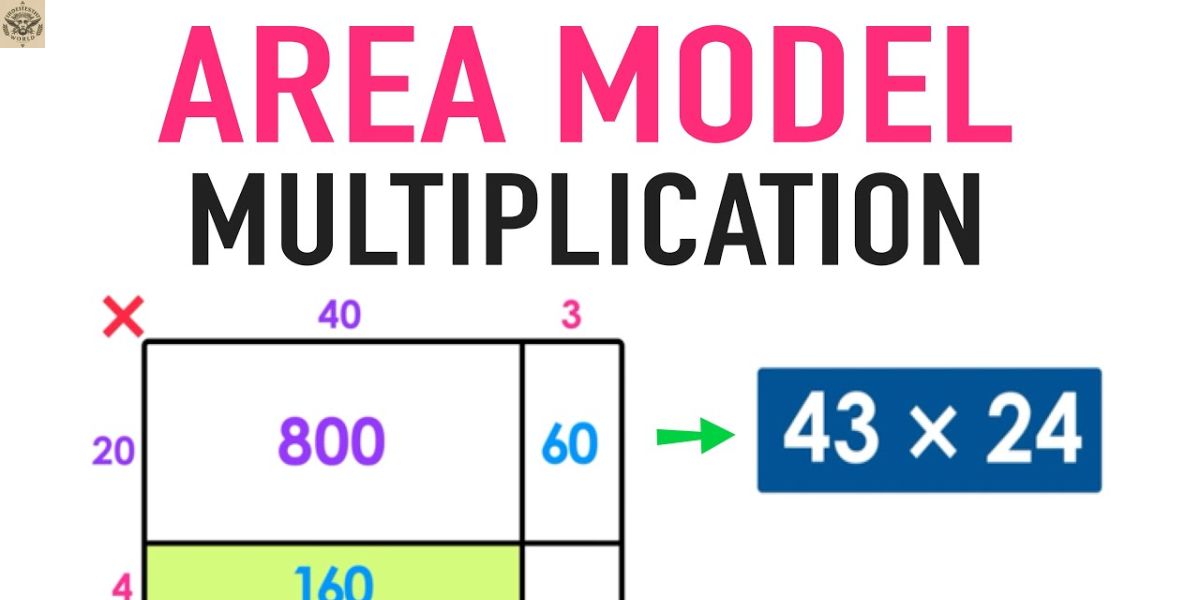
When students use an area model for multiplication, they are essentially turning a multiplication equation into a rectangle that has been split into smaller, easier chunks. This is often called multiplication using an area model, or multiplying two-digit numbers with rectangles, and it follows a clear, repeatable process.
Example: Multiply 23 × 15
- Draw a rectangle to represent the multiplication equation. One side is 23 units, and the other side is 15 units.
- Break apart each side length by place value. Using expanded notation, 23 becomes 20 + 3, and 15 becomes 10 + 5.
- Label the sides with these expanded parts, then draw lines through the rectangle so it splits into four smaller sections.
- Each of the four sections now represents a smaller multiplication problem inside the bigger one.
- Multiply the dimensions of each section to find the partial products:
- 20 × 10 = 200
- 20 × 5 = 100
- 3 × 10 = 30
- 3 × 5 = 15
- Add all four partial products together: 200 + 100 + 30 + 15 = 345.
So, 23 × 15 = 345, and the area model shows exactly how that answer was built, piece by piece, instead of asking students to trust a memorized procedure. This same area model process works for any two-digit by two-digit multiplication equation, and it scales up naturally as students grow more comfortable with larger numbers.
This step-by-step process is one of the clearest multiplication methods available because every partial product is visible and checkable. Rather than one big, abstract calculation, students see four small, friendly ones that add up to the whole. That visual math model turns multiplication into something students can reason about instead of something they just perform.
Area Model Division
Division using an area model, sometimes called an area model for division, works from the opposite direction of multiplication. Instead of starting with two known side lengths, students start with a known total area (the dividend) and one known side length (the divisor). Their job is to find the missing side length, which becomes the quotient.
This works because of a simple relationship: if Area equals length times width, then Area divided by width equals length.
Example: Divide 96 ÷ 4
- Draw a rectangle with a width of 4 units. The length is unknown, since finding that length is the goal of the division equation.
- The total area is 96. Break that total into smaller partial areas that divide evenly by 4, such as 40 + 40 + 16.
- Since 4 × 10 = 40, the first two partial lengths are each 10.
- Since 4 × 4 = 16, the last partial length is 4.
- Add the partial lengths together to get the total length, which is the quotient: 10 + 10 + 4 = 24.
So, 4 × 24 = 96, which means 96 ÷ 4 = 24. Writing the related multiplication equation first can help students see exactly what the division area model is asking them to find, and it keeps the connection between the area model and its matching multiplication equation front and center.
For students who are not yet confident about how to split the total area evenly, a “build up” approach works well. A student can start with a side length of 10, which accounts for a partial area of 40. That leaves 56 of the total area still uncovered. Adding another side length of 10 covers another 40, leaving only 16 remaining. From there, a side length of 4 finishes the job. Adding those partial lengths together, 10 + 10 + 4, gives the same quotient of 24. This slower, incremental version of the area model for division is especially helpful for students who are just building confidence with divisor and dividend relationships.
Read More:Cone – Meaningful Math
Teaching Strategies for the Area Model
Teaching the area model well takes more than showing one worked example. Students need repeated exposure to the area model through hands-on tools, real-world problems, and open discussion before it becomes a strategy they reach for on their own.
Hands-On and Visual Tools
The area model becomes far more meaningful when students can touch it before they draw it. Square tiles, base-ten blocks, and grid paper all give students a physical or visual way to build a grid model before moving to pencil and paper.
For multiplication, students can use base-ten blocks to physically build the array for a problem like 23 × 15. That means 2 ten-rods and 3 unit cubes along one side, and 1 ten-rod and 5 unit cubes along the other. Once the array is filled in with matching rods and cubes, students can count the pieces to confirm the total area, which reinforces the connection between rectangular arrays and multiplication equations. A helpful classroom tip is to keep factors under 30 when using manipulatives, since larger area models become difficult to physically build and count.
For division, graph paper works well as a grid model. To divide 84 ÷ 6, for instance, students can draw a rectangle with a width of 6 and gradually extend the length until the area reaches 84 squares. This hands-on version of the area model bridges the concrete stage of learning with the more abstract stage that comes later with the standard algorithm.
Real-World Connections
Word problems help students see that an area model is not just a classroom exercise. Try prompts like these:
- A farmer plants 24 rows of 12 plants each. How many plants are there in total? Use an area model to break the problem into manageable parts.
- A rectangular garden has an area of 72 square feet, and one side measures 8 feet. What is the length of the missing side?
These kinds of real-world problems turn the area model into a genuine problem-solving strategy rather than an isolated math skill.
Flexibility in Decomposing Numbers
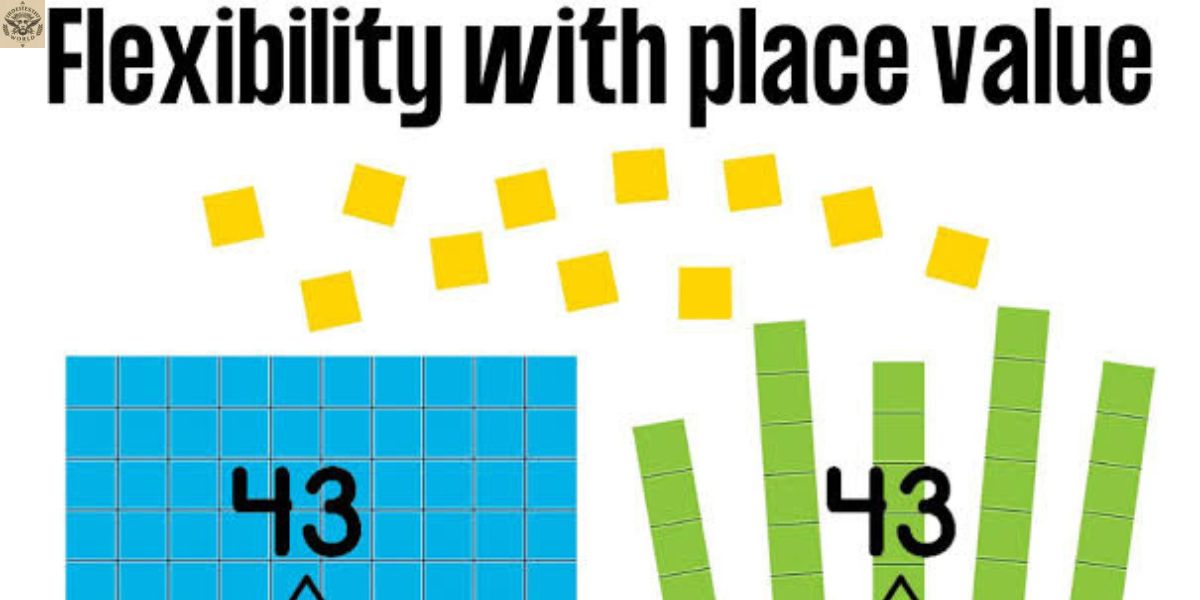
One of the underrated strengths of the area model is that there is more than one correct way to decompose a number. When solving 84 ÷ 3, one student might break 84 into 30 + 30 + 12 + 12, while another might use 60 + 24. Both area models lead to the same correct quotient. Comparing different approaches as a class is a great way to build flexible mathematical thinking and show students that a strategy, not just an answer, is worth discussing.
Precision Matters in an Area Model
Precision is what separates a strong area model from a rushed one. A well-drawn area model should roughly reflect the real proportions of the numbers involved. A rectangle representing 24 × 85 should look long and narrow, while a rectangle representing 39 × 42 should look closer to a square. When students draw an area model that ignores these proportions, they lose one of its biggest advantages.
The placement of decomposing lines matters too. If a side length of 37 is split into 30 and 7, the dividing line should sit closer to one end, not straight down the middle, so it accurately shows that 30 is much longer than 7.
This attention to proportion is what turns an area model into a self-checking tool. If a student calculates the area of a small section as a large number, or the area of a large section as a small number, the visual mismatch is often enough to catch a calculation error before it becomes a wrong final answer.
Common Misconceptions About the Area Model
Even well-designed lessons can leave students with a few misconceptions about how the area model actually works. Addressing these directly keeps the area model useful across every operation students meet it in.
Misconception 1: The area model only works for multiplication. Because most students see the area model for multiplication first, they sometimes assume it does not apply to division. Reinforcing division area models, where the total area and one side length are known and the missing side length is the quotient, helps clear up this misunderstanding.
Misconception 2: Once you know the standard algorithm, the area model is no longer necessary. Knowing the steps of a procedure is not the same as understanding why it works. The area model exposes the structure behind both multiplication and division, including the distributive property, so students genuinely understand what the standard algorithm is doing rather than just following it.
Misconception 3: The area inside the rectangle is always the final answer. In multiplication, the area does represent the product, which is usually the answer students want. In division, though, the area represents the dividend, and the quotient is a side length, not the area itself. This shift can confuse students who built most of their early experience around multiplication. Teaching both operations together, and having students write the related multiplication equation before solving a division problem, helps make this distinction clear from the start.
Why the Area Model Matters
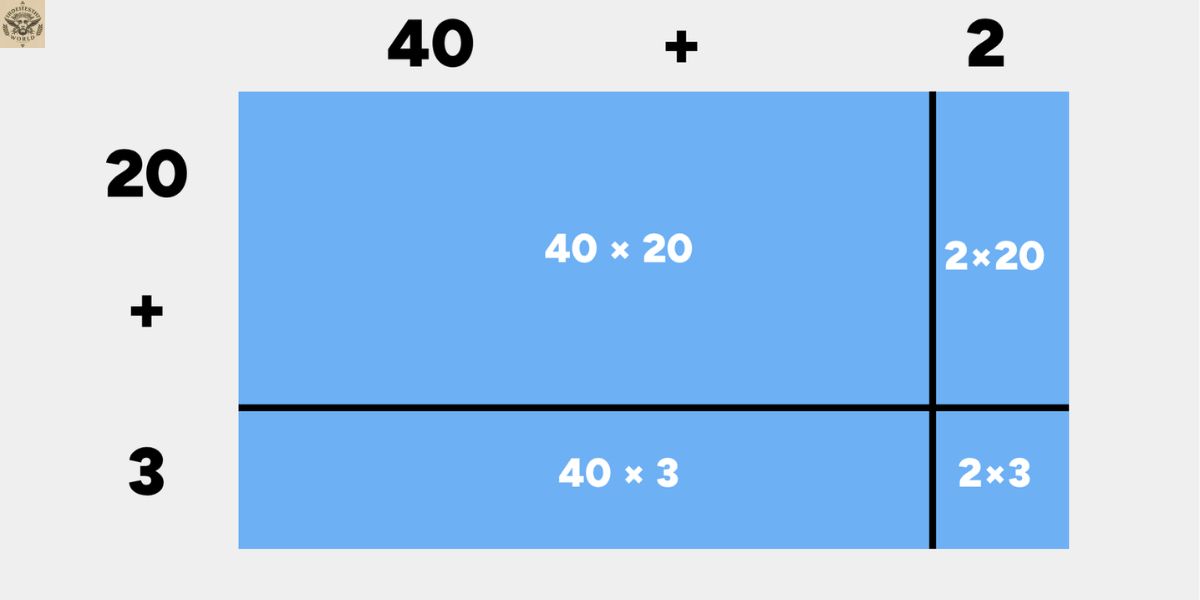
Few visual math models cover as much ground as the area model does. The area model gives students a visual, flexible, and reasoning-based path into multiplication and division. It connects place value, expanded form, arrays, and the distributive property into one consistent math representation that scales from small two-digit problems all the way up to more advanced arithmetic. Used consistently and taught with attention to precision, the area model builds the kind of conceptual understanding and number sense that supports every math strategy a student will use later on. Whether it appears as a multiplication area model in third grade or a division area model in later years, this single visual tool keeps paying off.
Area Model Division
An area model for division flips the usual multiplication setup around. Instead of starting with two known side lengths, students start with a known total, the dividend, and one known side length, the divisor. From there, the area model becomes a search for the missing side length, which turns out to be the quotient. This division area model works because area, length, and width are all connected: if you know the total area and one side, you can always find the other side.
What makes this version of the area model so useful is how naturally it turns division into a visual, checkable process. Students break the dividend into smaller, friendlier partial areas, divide each piece by the divisor, and add the results back together to land on the quotient. Rather than guessing at an answer, students can see, step by step, exactly why that answer makes sense.
Area Model Fractions
The same rectangular model used for whole numbers also works well once fractions enter the picture. In an area model for fraction multiplication, each factor is represented as a fraction of a side length rather than a whole number, and the overlapping region inside the rectangle shows the product. This gives students a visual math model for a topic that often feels far more abstract than whole-number multiplication.
Using an area model with fractions also reinforces ideas like equal parts and shared area, since students can literally see how much of the rectangle is covered when two fractional side lengths overlap. This visual approach helps students move past memorized fraction rules and toward a real understanding of why multiplying two fractions produces a smaller result than either fraction alone.
Area Model Multiplication
Area model multiplication breaks a larger multiplication equation into smaller, more manageable partial products. Each factor becomes a side length of a rectangle, and place value is used to split each side into expanded parts, such as tens and ones. Once the rectangle is divided into smaller sections, multiplying each section separately and adding the partial products together gives the final product.
This multiplication strategy is especially valuable because it exposes the distributive property in action rather than asking students to accept it as a rule. Students see exactly why breaking apart numbers and multiplying the pieces separately still produces the correct total, which builds a much stronger foundation than simply memorizing the standard algorithm.
Area Model Example
A simple area model example makes the whole strategy click faster than any explanation on its own. Picture a rectangle representing 34 × 6. The side of 34 splits into 30 and 4, giving two smaller rectangles: one that is 30 × 6 and one that is 4 × 6. Multiplying each part gives 180 and 24, and adding those partial products together gives a final product of 204.
This kind of worked example shows how a math representation as simple as a rectangle can carry an entire multiplication equation from start to finish. Working through several examples, with different numbers and different levels of difficulty, helps students recognize the same pattern every time, no matter how the numbers change.
4th Grade Area Model
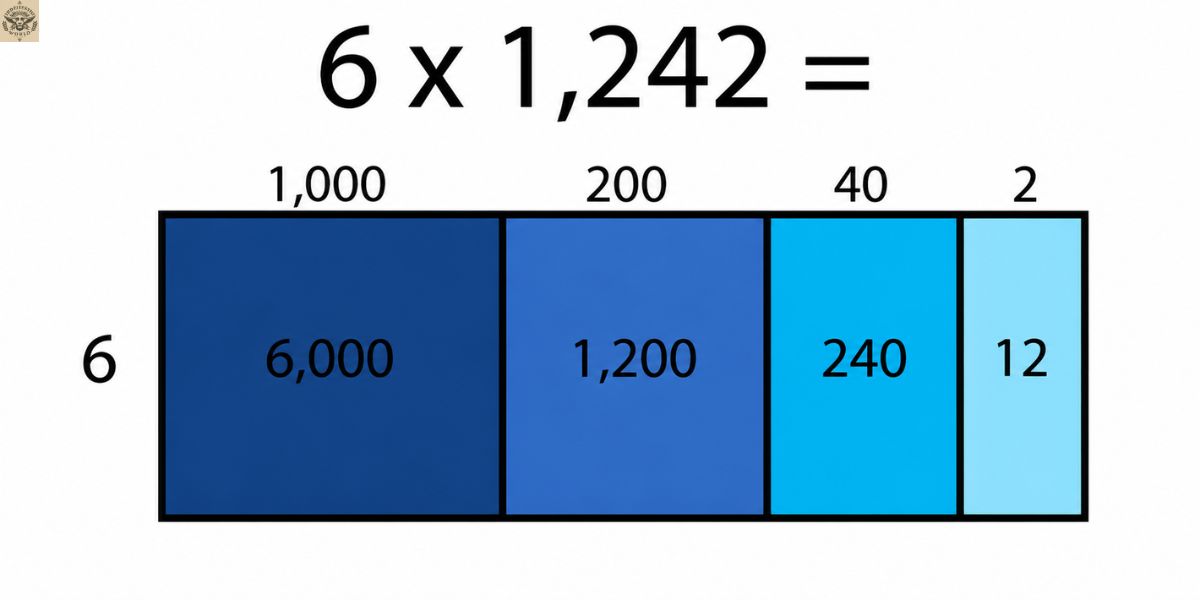
By fourth grade, most students are ready to use the area model for two-digit by two-digit multiplication and for division problems with larger dividends. At this stage, the area model becomes less about the visual itself and more about using it efficiently to solve multiplication using an area model or division using an area model with real confidence.
Fourth grade classrooms often pair the area model with real-world word problems, mental math checks, and connections to the standard algorithm. This keeps the strategy from feeling like an isolated skill and instead shows students how the same rectangular model supports the multiplication and division work they will keep doing in later grades.
Area Model Calculator
Change block type or style
Move Paragraph block from position 62 up to position 61
Move Paragraph block from position 62 down to position 63
Change alignment
Change text alignment
Displays more block tools
An area model calculator is simply a digital tool that automates the same process a student would do by hand: splitting factors by place value, generating each partial product or partial area, and adding the pieces together for a final answer. These tools can be useful for checking work quickly, but they work best as a support rather than a replacement for the hands-on process.
Students still benefit most from building the area model themselves before turning to a calculator, since drawing the rectangle and labeling each section is what builds real conceptual understanding. A calculator can confirm that an answer is correct, but it cannot replace the reasoning a student develops by working through the partial products step by step.
Area Model Multiplication 4th Grade
Fourth grade multiplication standards typically ask students to multiply two-digit numbers by two-digit numbers, and the area model is one of the clearest multiplication methods for meeting that expectation. Students split each factor by place value, build a rectangle with four sections, and calculate each partial product before combining them into a final answer.
At this grade level, students are also expected to explain their reasoning, not just produce a correct product. The area model supports that expectation directly, since every partial product is visible and can be described in words, which makes it easier for fourth graders to justify their thinking during class discussions or on written assessments.
Area Model Multiplication Worksheet
A well-designed area model multiplication worksheet usually includes a mix of practice problems, from small, friendly multiplication equations to larger two-digit by two-digit problems that require more decomposing. Good worksheets often include a blank rectangle template so students can practice labeling side lengths, splitting them by place value, and filling in each partial product on their own.
The best worksheets also build in a few word problems, so students practice choosing when an area model is the right multiplication strategy in the first place, not just filling in a template. Mixing straightforward practice with a handful of applied problems keeps a worksheet useful for both new learners and students who are ready for a bit more challenge.
Frequently Asked Questions
What is an area model example?
A simple area model example is a rectangle for 34 × 6, split into 30 × 6 and 4 × 6. Adding the two partial products, 180 and 24, gives a final answer of 204.
What is the definition of an area model?
An area model is a rectangle used to represent multiplication or division, where the sides stand for the factors or dimensions and the inside shows the total area.
How do you calculate an area model?
Split each side length by place value, multiply the smaller sections to find partial products, then add those partial products together for the final answer.
Is an area model a diagram?
Yes, an area model is a visual diagram. It uses a rectangle to turn a multiplication or division equation into something students can see and check.
What is the formula for area?
The formula for area is length times width, written as A = l × w, and it is the same formula that gives the area model its rectangle shape.
Conclusion
Across division, fractions, multiplication, worked examples, and grade-specific practice, the area model keeps showing up as one of the most dependable visual math models a student can learn. It turns an abstract multiplication equation or division equation into a rectangular model students can actually see, which makes ideas like partial products, place value, and the distributive property much easier to grasp. Whether a student is just starting with a simple area model example or working through a full area model multiplication worksheet, the same core idea carries through every version of the strategy.
What ties all of these variations together is flexibility. An area model for division works the same way as an area model for multiplication, just in reverse, and the jump to area model fractions follows that same logic once students are ready for it. By fourth grade, most learners can move between a hands-on rectangle, a calculator check, and a written worksheet without losing sight of the reasoning underneath. That consistency is exactly why the area model remains such a reliable math strategy long after students first learn to draw one.

