

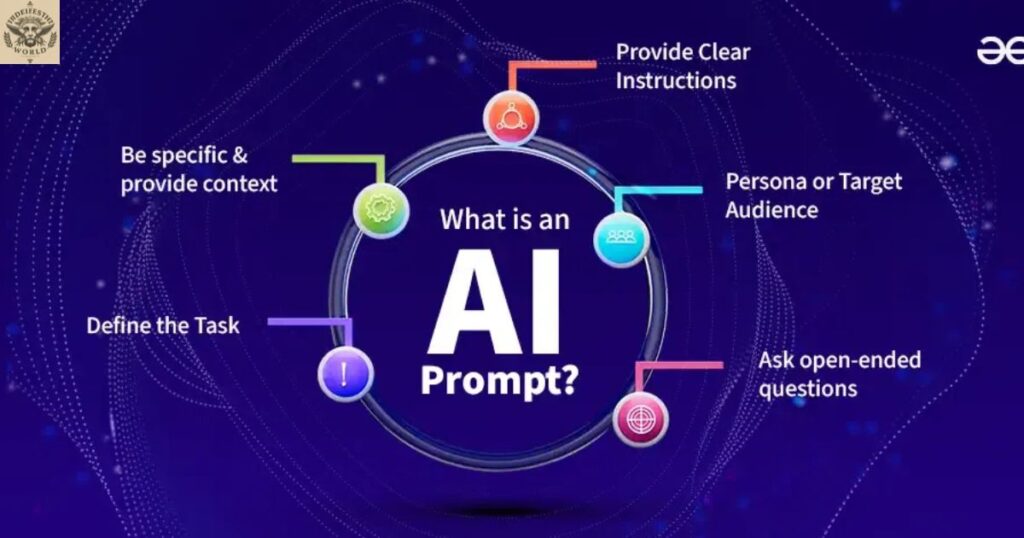
Artificial intelligence is becoming a useful part of everyday life. People use AI tools to write articles,Prompt Meaning in AI create images, solve problems, learn new skills, and complete work faster. However, the quality of the results often depends on the instructions given to the AI tool. These instructions are commonly called prompts.
Understanding prompt meaning in AI helps beginners communicate more effectively with AI systems. A prompt can be a simple question, a detailed command, a piece of text, or a combination of instructions and examples. Learning how prompts work makes it easier to receive relevant, clear, and useful answers.
In this guide, readers will learn the definition of an AI prompt, its different types, practical examples, common mistakes, and simple techniques for writing better instructions. The guide also explains prompt engineering and the limitations of AI-generated responses.
What Is a Prompt in AI?
A prompt in AI is an instruction, question, or input provided to an artificial intelligence system to produce a response or perform a task. The system processes the input and generates an output based on its training, available context, and capabilities.
For example, typing Explain climate change in simple English into an AI chatbot is a prompt. The chatbot uses that instruction to generate an explanation. Similarly, asking an image generator to create a picture of a modern house provides the system with a visual prompt.
The prompt meaning in AI becomes easier to understand when it is viewed as communication between a user and an AI tool. The user describes a task, and the system attempts to complete it. Clear instructions can improve the relevance of the result, although they cannot guarantee complete accuracy.
Simple Definition of an AI Prompt
An AI prompt is the input that tells an AI system what to do, answer, create, or analyze.
Here are some simple examples:
- Translate this sentence into Spanish.
- Write a short email to a customer.
- Explain photosynthesis to a ten-year-old student.
- Create an illustration of a peaceful garden.
- Summarize this report in five bullet points.
Each instruction gives the AI a task. The more clearly the task is described, the easier it may be for the system to produce an appropriate response.
Prompt Meaning in AI in Simple English
In simple English, a prompt means a question or instruction given to an AI tool to get a particular result. It tells the tool what the user needs and may also explain how the answer should look.
For example, someone can ask an AI assistant to explain a difficult word, write a paragraph, or suggest ideas for a school project. The request itself is the prompt. The text, answer, or suggestions generated by the system are the output.
Understanding prompt meaning in AI does not require advanced technical knowledge. Anyone who can describe a task clearly can begin writing useful prompts. Students, teachers, office workers, business owners, and content creators can all use this skill in their daily activities.
Read More: AI News Meaning: Definition, Examples, Uses, and Latest Trends
Prompt Meaning in AI in Urdu

AI mein prompt ka matlab hai woh sawal, hidayat, ya instruction jo kisi artificial intelligence tool ko diya jata hai taake woh koi khaas kaam kare ya jawab de.
Misal ke taur par, agar koi AI se kahe, Mujhe English mein ek paragraph likh kar do, to yeh ek prompt hai. AI is instruction ko process karke paragraph generate karta hai.
Isi tarah,Prompt Meaning in AI AI se tasveer banwana, kisi mushkil topic ko samajhna, text ka translation karwana, ya kisi document ka summary hasil karna bhi prompts ke zariye mumkin hai. Seedhe alfaaz mein, prompt AI ko batata hai ke kya karna hai aur zaroorat par yeh bhi batata hai ke kaam kis tarah karna hai.
How Does an AI Prompt Work?
AI prompts work by providing a system with information or instructions that guide its response. The system processes the input using its underlying model and generates an answer based on learned patterns, the conversation context, and the tools available to it.
For example, when a user asks an AI assistant to explain a scientific concept, the system interprets the request and produces an explanation. If the user then asks for a simpler version with examples, the assistant can use that follow-up instruction to revise its response.
The exact process differs between AI systems. A text chatbot,Prompt Meaning in AI image generator, and voice assistant may process different kinds of inputs. Nevertheless, the basic idea behind prompt meaning in AI remains similar: the user supplies an input, and the AI system uses it to guide the output.
The Basic Prompt Process
- Enter an instruction: Describe the question or task.
- Provide context: Include useful background information when needed.
- Let the AI process the input: The system interprets the request according to its design.
- Review the output: Check whether the response meets the requirements.
- Refine the prompt: Add details or clarify instructions if the result needs improvement.
This process is useful for everyday tasks as well as more complex activities. It also shows why reviewing and improving an initial response can be an important part of working with AI.
Types of AI Prompts
AI prompts come in several forms. The type used depends on the task, Prompt Meaning in AIthe input supported by the tool, and the result the user wants.
Text Prompts
Text prompts are written instructions or questions entered into an AI system. They are commonly used for writing, research assistance, translation,Prompt Meaning in AI explanations, and brainstorming.
- Example: Write a 200-word article about renewable energy using simple English.
This instruction identifies the task, subject, approximate length, and language style.
Image Prompts
Image prompts describe the visual content a user wants an AI image generator to create. They can include subjects, settings,Prompt Meaning in AI lighting, artistic styles, colors, and composition.
- Example: Create a realistic photograph of a small modern home surrounded by green trees in soft morning light.
The description gives the image generator more information about the intended scene. The final result still depends on the capabilities of the selected tool.
Audio and Voice Prompts
Audio prompts involve spoken instructions or audio recordings processed by compatible AI systems. Depending on the tool,Prompt Meaning in AI users can ask questions by voice, transcribe recordings, or analyze spoken content.
- Example: Transcribe this meeting recording and organize the main discussion points.
The system may convert speech into text or provide a summary if those features are supported.
Coding Prompts
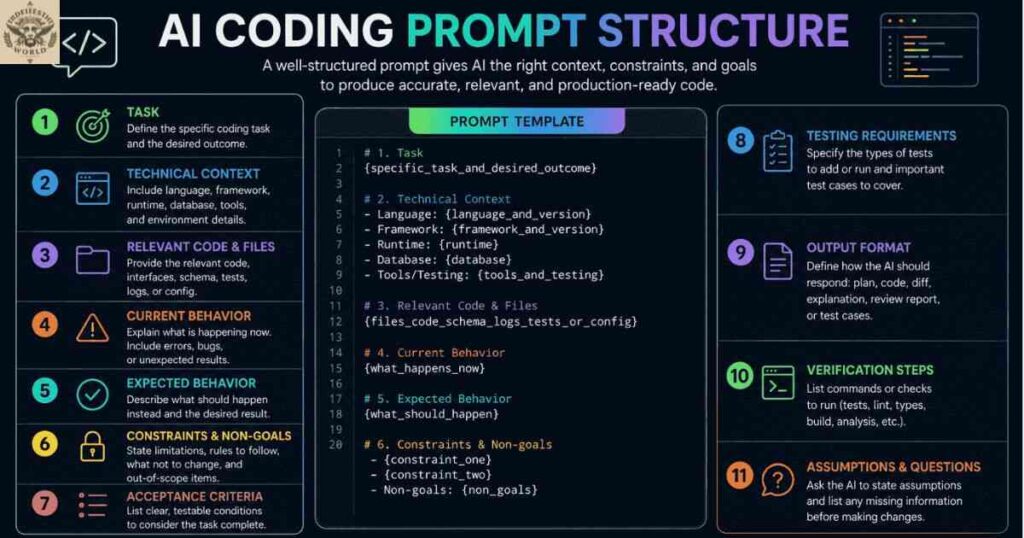
Coding prompts instruct an AI tool to write, explain, review, or troubleshoot computer code. They are useful for beginners who need explanations and developers who want help identifying errors.
- Example: Write a Python function that checks whether a number is even or odd, and explain each line.
A detailed coding prompt can specify the programming language, desired behavior, and explanation style.
Follow-Up Prompts
Follow-up prompts are additional instructions given after an AI system has already responded. They help users clarify a request, correct an issue, or improve an earlier answer.
Example:
- Initial prompt: Explain digital marketing.
Follow-up prompt: Make the explanation easier to understand and add three examples for small businesses.
Follow-up instructions are particularly useful when the first response is too general or does not fully meet the user’s needs.
Data Analysis Prompts
Data analysis prompts an AI tool to examine supported data, identify patterns, calculate results, or summarize findings.
- Example: Analyze this sales table,Prompt Meaning in AI identify the three best-performing products, and summarize the main trends.
The reliability of the output depends on the quality of the supplied data, the tool’s analytical capabilities, and whether the results are checked.
What Makes a Good AI Prompt?
A good prompt clearly communicates the task and includes the details needed to complete it. It does not always need to be long. A short, direct instruction can work well for a simple question, while a complicated task may require additional context and constraints.
When exploring prompt meaning in AI, it is useful to understand the main elements that can improve an instruction.
Clear Task
Tell the AI exactly what action to perform. Words such as explain, summarize, compare, translate, and create can help establish the goal.
- Instead of writing Climate change, try Explain the main causes of climate change in simple English.
Relevant Context
Context explains the background or purpose of the request. It helps the AI tailor the response to a particular situation.
- For example, asking for a marketing plan for a small local bakery gives more useful context than simply asking for a marketing plan.
Intended Audience
Specify who will read or use the output. A response for schoolchildren may need different vocabulary and examples than a report written for business professionals.
- Example: Explain cybersecurity for beginners who have never studied computers.
Output Format
Tell the AI whether the result should be a paragraph, table, checklist, email, outline, or numbered list.
- Example: Compare solar and wind energy in a table with three advantages and three disadvantages for each.
Constraints and Requirements
Constraints establish limits or special requirements, such as word count, tone, language, reading level, or information to include.
- Example: Write a friendly email in fewer than 150 words, using simple English and a professional tone.
Combining these elements can make instructions more precise. However, users should include only the details relevant to the task rather than adding unnecessary information.
Weak Prompt vs. Strong Prompt
One of the easiest ways to understand prompt meaning in AI is to compare vague instructions with specific ones. A weak prompt may leave important details unclear, while a stronger prompt explains the desired task and result.
| Weak prompt | Strong prompt |
| Write about technology. | Write a 300-word beginner-friendly article about how technology helps students learn. |
| Make a picture. | Create a realistic image of a cozy home office with natural light and a wooden desk. |
| Explain coding. | Explain Python variables with three short code examples for beginners. |
| Summarize this. | Summarize the supplied report in five bullet points, keeping its main findings. |
| Help with my website. | Suggest five improvements to a beginner-friendly blog’s navigation, readability, and mobile layout. |
The stronger examples explain what the user wants and often specify the format or audience. However, a prompt is not automatically better simply because it contains more words. Extra instructions should support the goal rather than distract from it.
What Is Prompt Engineering?
Prompt engineering is the process of designing,Prompt Meaning in AI testing, and refining instructions to help an AI system produce useful results. It involves choosing appropriate wording, providing relevant context, adding examples when helpful, and evaluating the generated output.
For example, a blogger might initially ask an AI tool to write an article about healthy eating. If the response is too technical, the blogger can refine the instruction by requesting simple language, practical examples, and clear headings. This process demonstrates how prompt engineering can improve the usefulness of AI-generated content.
Understanding prompt meaning in AI provides the foundation for this skill, but prompt engineering involves more than writing a single question. It may require testing different instructions, comparing results, and adjusting the approach for a particular tool or task.
Prompt vs. Prompting vs. Prompt Engineering
| Term | Meaning |
| Prompt | The input or instruction given to an AI system. |
| Prompting | The act of providing instructions and interacting with the system. |
| Prompt engineering | The process of designing and refining prompts to improve results. |
These terms are related, but they describe different parts of the interaction between people and AI tools.
Common Prompting Techniques
Several techniques can help users communicate more effectively with AI systems. The right choice depends on the task and the capabilities of the model.
Zero-Shot Prompting
Zero-shot prompting means giving an AI a task without supplying examples of the desired answer.
Example: Translate this sentence into French.
This method is often sufficient for straightforward tasks that the model can handle from the instruction alone.
Few-Shot Prompting
Few-shot prompting provides one or more examples to demonstrate the expected response or pattern.
Example:
- Input: Happy — Output: Positive
- Input: Disappointed — Output: Negative
- Input: Excited — Output: Positive
- Input: Worried — Output: ?
The examples show the AI how to classify similar words. The technique can be useful when a task requires a particular format or consistent pattern.
Multi-Turn Prompting
Multi-turn prompting uses multiple messages to develop or refine a result. Rather than explaining every requirement at once, a user can start with a basic instruction and provide additional details as needed.
For example, a user might ask for a blog outline, request more detailed headings, and then ask for examples under each heading. Each follow-up helps guide the next response.
Role-Based Prompting
Role-based prompting asks an AI system to approach a task from a particular perspective.
Example: Act as an English tutor and explain the difference between a noun and a verb to a beginner.
This can help establish the desired style and level of explanation. However, assigning a role does not make the AI a qualified professional or guarantee that its answer is correct.
How to Write an Effective AI Prompt Step by Step
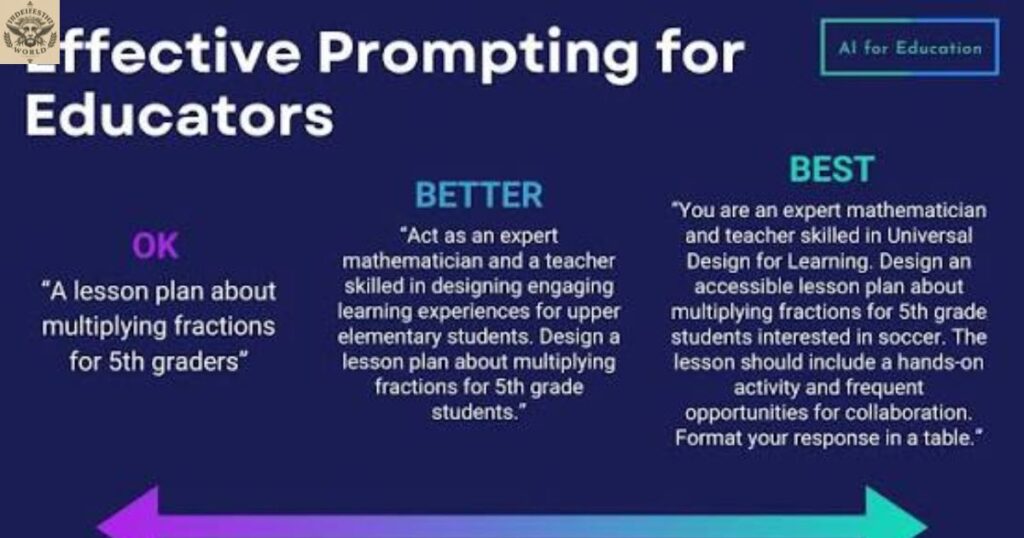
Writing an effective prompt is a skill that improves with practice. These steps provide a simple starting point for beginners.
- Identify the goal. Decide exactly what the AI should create, explain, or analyze.
- Add useful context. Explain the purpose of the task and provide the information the AI needs.
- Describe the audience. Mention whether the result is for beginners, students, customers, or specialists.
- Choose the format. Request a paragraph, table, list, email, or another suitable structure.
- Include important limits. Specify the language, tone, length, or other essential requirements.
- Review the response. Check whether it answers the question and follows the instructions.
- Refine the prompt. Add clarification or request corrections when necessary.
For example, someone creating a blog post could use this template:
Write a beginner-friendly article about [topic]. Use simple English, organize the content with clear headings, include practical examples, and explain any difficult terms. Keep the information accurate and identify anything that needs further verification.
This template can be adjusted for different subjects. Users should still review the generated article and verify important facts before publishing it.
Real-Life Uses of AI Prompts
AI prompts can support a wide range of everyday activities. Their usefulness depends on how well the instructions match the task and whether the chosen tool can perform it.
For Students and Teachers
Students can ask AI tools to explain difficult subjects, generate practice questions, summarize supplied notes, or provide examples of grammar rules. Teachers may use prompts to prepare lesson outlines and classroom activities.
- Example: Explain the water cycle to a 12-year-old student using a simple example.
AI-generated information should be checked against reliable learning materials, and students should follow their school’s rules for AI use.
For Bloggers and Content Writers
Writers can use prompts to brainstorm article ideas, create outlines, improve readability, draft descriptions, and summarize research. A useful instruction specifies the audience, purpose, tone, and structure.
- Example: Create an outline for a beginner’s guide to renewable energy with six main headings and practical examples.
Writers should fact-check the output, verify sources, and make sure the final article provides original value.
For Graphic Designers
Compatible AI image tools can use prompts to generate visual concepts, illustrations, and design references. Details such as composition,Prompt Meaning in AI lighting, subject, and style help communicate the intended result.
- Example: Create a clean editorial illustration of a small plant growing beside a laptop on a bright desk.
The resulting image may not follow every instruction exactly, so designers may need to refine the description or edit the result.
For Programmers
Developers can use AI prompts to explain code, generate draft functions, suggest tests, and investigate errors. Good instructions include the programming language, the intended behavior, and relevant error messages.
- Example: Review this JavaScript function for possible errors and explain each suggested change.
Generated code should be tested and reviewed for security, correctness, and compatibility before use.
For Businesses and Office Workers
Businesses can use AI prompts to draft emails, organize meeting notes, brainstorm campaigns, and summarize non-sensitive documents. Clear requirements help the tool produce a response suited to the intended audience.
- Example: Draft a polite follow-up email to a customer about an unanswered quotation. Keep it professional and under 120 words.
Users should follow their organization’s privacy and data-handling policies when using AI tools.
Common AI Prompt Writing Mistakes
Even experienced users can write unclear prompts. Recognizing common mistakes makes it easier to improve the quality of the interaction.
Giving Vague Instructions
A request such as Write something interesting does not establish a clear topic or purpose. A more specific instruction explains the subject,Prompt Meaning in AI audience, and expected result.
Leaving Out Important Context
Without relevant background information, the AI may produce a generic answer that does not fit the situation. Include the necessary details while avoiding irrelevant information.
Ignoring the Output Format
If the response needs to be a table, checklist, or short email, state that requirement in the prompt. Otherwise, the AI may choose a format that requires additional editing.
Adding Conflicting Requirements
Instructions can become difficult to follow when they demand incompatible outcomes, such as an extremely short answer containing every detail of a lengthy report. Prioritize the most important requirements and make the limits realistic.
Expecting Perfect Results on the First Attempt
AI tools can misunderstand instructions or omit important information. Review the response and use follow-up prompts to clarify what needs improvement.
Trusting Every AI Answer
AI-generated content can contain factual errors, outdated claims, or fabricated references. Verify important information using reliable sources, especially for medical, legal, financial, and safety-related topics.
Sharing Sensitive Information
Avoid entering passwords, confidential business information, or unnecessary personal data into AI tools. Review the service’s privacy policies and use approved tools for sensitive work.
Benefits and Limitations of AI Prompts
AI prompts make it easier to communicate tasks to artificial intelligence systems. They can save time, support creative work,Prompt Meaning in AI and help users explore subjects that might otherwise require more effort.
Main Benefits
- Efficiency: AI can help draft, summarize, and organize information quickly.
- Flexibility: The same tool may support writing, learning, coding, and brainstorming.
- Customization: Users can request different tones, formats, and levels of detail.
- Learning support: Prompts can help explain concepts through examples and simpler language.
- Creative assistance: Users can explore ideas for articles, designs, stories, and projects.
Important Limitations
- Accuracy: A clear instruction does not guarantee a correct answer.
- Ambiguity: The system may interpret unclear wording differently than intended.
- Tool restrictions: Not every AI tool can process images, audio, code, or documents.
- Context limits: Very long conversations or large documents may exceed the model’s available context.
- Privacy concerns: Information entered into a service may be handled according to its specific data policies.
- Human review: Important outputs may require independent verification, testing, or expert judgment.
The best approach is to treat AI as a useful assistant rather than an infallible source of information. Clear prompts can improve communication, but responsible use also requires checking the results.
Frequently Asked Questions
What Is an AI Prompt in Simple Words?
An AI prompt is a question, instruction, or input given to an artificial intelligence tool to complete a task. For example, asking an AI assistant to explain a difficult word is a prompt.
What Is an Example of an AI Prompt?
An example is: Explain artificial intelligence in simple English and give three everyday examples.
What Is the Difference Between a Prompt and Prompt Engineering?
A prompt is the actual input given to an AI system. Prompt engineering is the process of designing, testing, and refining instructions to help the system produce more useful results.
How Do You Write a Good AI Prompt?
Start with a clear task, add relevant context, identify the intended audience, and specify the desired format. Review the response and refine your instructions if the result does not meet your needs.
Can an AI Prompt Produce an Incorrect Answer?
Yes. AI systems can generate incorrect information even when instructions are clear. Verify important claims through reliable sources and test AI-generated code or calculations before relying on them.
Conclusion
Understanding prompt meaning in AI helps people communicate more effectively with artificial intelligence tools. A prompt can be a simple question or a detailed set of instructions describing a task,Prompt Meaning in AI, its context, and the desired output.Writing useful prompts does not require advanced technical knowledge. Start with a clear goal, provide relevant details, Prompt Meaning in AI choose an appropriate format, and improve the instructions when necessary.
Over time, these habits can help students, writers, designers, and professionals use AI more effectively. Remember that better instructions can improve the relevance of a response, Prompt Meaning in AI but they cannot guarantee accuracy. Reviewing the output, checking important facts, and protecting sensitive information remain essential parts of responsible AI use.

